Result
Full
HTML
CSS
JS
Edit
Download
Full Code
<!DOCTYPE html>
<html>

<head>
  <meta charset="utf-8">
  <title>ZingGrid Demo</title>
  <script nonce="undefined" src="https://cdn.zinggrid.com/zinggrid.min.js"></script>
  <style>
    body {
      background: #e6e6e6;
    }

    zing-grid[loading] {
      height: 277px;
    }
  </style>
</head>

<body>
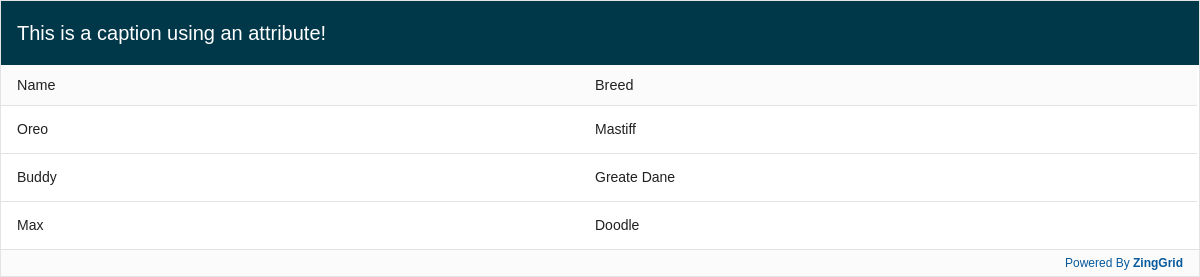
  <zing-grid caption="This is a caption using an attribute!" data='[{"name": "Oreo","breed":"Mastiff"}, {"name": "Buddy","breed":"Greate Dane"}, {"name": "Max","breed":"Doodle"}]'>
  </zing-grid>
  <script>
    ZingGrid.setLicense(['26ccbfec16b8be9ee98c7d57bee6e498']);
  </script>
</body>

</html>
<!DOCTYPE html>
<html>
  <head>
    <meta charset="utf-8">
    <title>ZingGrid Demo</title>
    <script src="https://cdn.zinggrid.com/zinggrid.min.js"></script>
  </head>
  <body>
    <zing-grid
      caption="This is a caption using an attribute!"
      data='[{"name": "Oreo","breed":"Mastiff"}, {"name": "Buddy","breed":"Greate Dane"}, {"name": "Max","breed":"Doodle"}]'>
    </zing-grid>
	</body>
</html>
body{background:#e6e6e6;}
// No JS code
Related Docs
Interested in this demo? Modify it to your needs in ZingSoft Studio, our testing sandbox. It's free to sign up, and you can come back and edit at any time!
Related Docs
Demo Gallery
-
Filter Summary Chart -
[Gallery Demo] Batch Editing -
Most & Least Favorite Pizza Toppings in America (codepenchallenge cpc-circle) -
Row Selector Column Type -
Filter Column on Render -
Expandable Cell Content -
Unordered List Column Type -
Expandable Row with Nested Grid -
Expandable Row -
Font Awesome Column Type -
Icon Column Type -
Native Element Column Type -
Range Column Type -
Toggle Column Type -
Select Column Type -
Boolean Column Type -
Date Column Type -
iframe Column Type -
Remover Column Type -
Editor Column Type -
Row Number Column Type -
Telephone Column Type -
URL Column Type -
Email Column Type -
Image Column Type -
Currency Column Type -
Number Column Type -
Turn off Autoformatted Headers -
User Defined Nested Headers -
Column Headers with Underscore Case Data -
Nested Headers -
Vertical and Horizontal Gridlines -
Styling with CSS Selectors -
Styling with CSS Variables -
Citing Data Source -
Default Loading Screen -
Default Editor Fields -
Infinite Scrolling -
Column Sorted on Render -
Row Selection -
Cell Selection -
Default Pager -
GitHub Issues -
Custom Menu -
Caption Positioning -
Caption Text Alignment -
Accessible Keyboard Navigation -
Website Visitors -
Nobel Prize Winners in 2018 -
Who In The World Uses IE8 -
Foreign Exchange Data -
Dark Theme -
Black Theme -
IOS Theme -
Android Theme -
Default Theme -
Popular Premier League Players -
International Number Formatting -
International Currency Formatting -
International Date Formatting -
Export ZingChart Data to ZingGrid -
Remove Filter from Columns -
Filtering by External Input -
Search Subset of Columns -
Drag to Reorder Columns -
Cursor Pagination -
Buttons with Slotted Content -
Drag to Hide Columns -
Spotify Demo -
Backblaze 2018 Hard Drive Stats -
Aggregation - Sum Total -
Aggregation - Max -
Aggregation - Min -
Aggregation - Row Count -
Aggregation - Average -
Top Tech Conferences in 2019 -
Global Average Absolute Sea Level Change (1880 - 2014) -
World's Oldest Stone Age Art -
Open Source Licenses -
Opening a Modal on Render -
Air Quotes -
Polymer Integration Demo -
History of the Fire Emoji -
CRUD Grid with Node Express Server -
Fitness Tracker Dashboard -
SoundCloud Chart -
ActBlue Donations -
Most Viewed Music Videos of All Time -
Server Monitor Component -
Mirrored Caption -
Filter Types -
Row Layout -
Pagination by External Inputs -
Pagination - Custom Page Size -
Search by External Input -
Static Menu -
Conditionally Rendered Columns -
Conditionally Rendered Cells -
Conditionally Rendered Rows -
Server Search -
Server Paging -
Zebra Striping -
Override Column Headers -
Column Headers with Kebab Case Data -
UpdateRow() -
Status Bar Success Toast -
Cryptocurrency Pricing -
Zingstagram -
ZingChart Stock Trends -
Server-Side Rendering -
Default Sorting -
Editing Data by Modal -
Editing Data by Row -
Caption with Slotted Content -
Caption with Custom Styling -
Adding a Caption -
Pagination - Custom Positioning -
Drill Down on Row Click -
Nested Grid Column Type -
Card Layout -
Default Filters -
Context Menu -
Default Search -
Layout Default -
Tech CEO Demo