Zebra Striping
You can achieve zebra striping through one simple attribute or CSS styling.
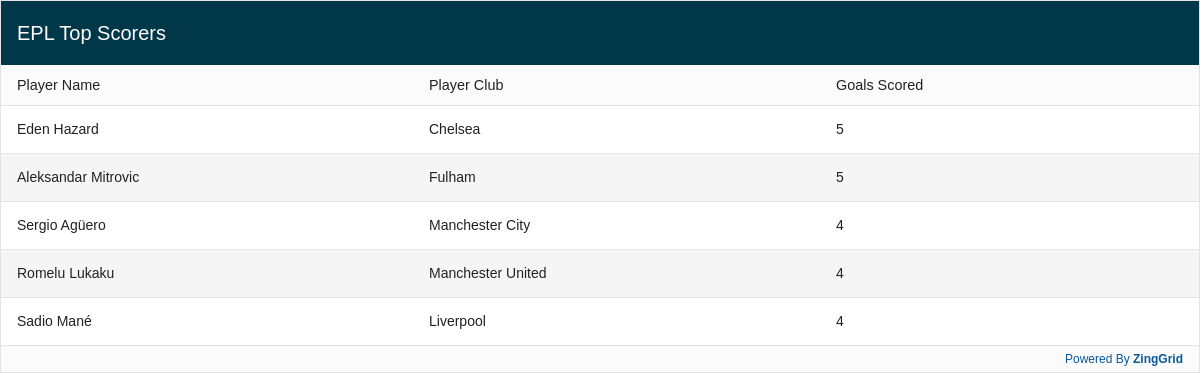
Result
Full
HTML
CSS
JS
Edit
Download
Full Code
<!DOCTYPE html>
<html>

<head>
  <meta charset="utf-8">
  <title>ZingGrid: Simple Grid</title>
  <script nonce="undefined" src="https://cdn.zinggrid.com/zinggrid.min.js"></script>
  <style>
    .zg-body {
      background: #e6e6e6;
    }

    zing-grid[loading] {
      height: 373px;
    }
  </style>
</head>

<body class="zg-body">
  <zing-grid caption="EPL Top Scorers" layout="row" layout-controls="disabled" zebra>
    <zg-data data='[
        {
          "playerName": "Eden Hazard",
          "playerClub": "Chelsea",
          "goalsScored": 5
        },
        {
          "playerName": "Aleksandar Mitrovic",
          "playerClub": "Fulham",
          "goalsScored": 5
        },
        {
          "playerName": "Sergio Agüero",
          "playerClub": "Manchester City",
          "goalsScored": 4
        },
        {
          "playerName": "Romelu Lukaku",
          "playerClub": "Manchester United",
          "goalsScored": 4
        },
        {
          "playerName": "Sadio Mané",
          "playerClub": "Liverpool",
          "goalsScored": 4
        }
      ]'></zg-data>
  </zing-grid>
  <script>
    ZingGrid.setLicense(['26ccbfec16b8be9ee98c7d57bee6e498']);
  </script>
</body>

</html>
<!DOCTYPE html>
<html>
  <head>
    <meta charset="utf-8">
    <title>ZingGrid: Simple Grid</title>
    <script src="https://cdn.zinggrid.com/zinggrid.min.js"></script>
  </head>
  <body class="zg-body">
    <zing-grid
      caption="EPL Top Scorers"
      layout="row"
      layout-controls="disabled"
      zebra>
      <zg-data
        data='[
        {
          "playerName": "Eden Hazard",
          "playerClub": "Chelsea",
          "goalsScored": 5
        },
        {
          "playerName": "Aleksandar Mitrovic",
          "playerClub": "Fulham",
          "goalsScored": 5
        },
        {
          "playerName": "Sergio Agüero",
          "playerClub": "Manchester City",
          "goalsScored": 4
        },
        {
          "playerName": "Romelu Lukaku",
          "playerClub": "Manchester United",
          "goalsScored": 4
        },
        {
          "playerName": "Sadio Mané",
          "playerClub": "Liverpool",
          "goalsScored": 4
        }
      ]'></zg-data>
    </zing-grid>
  </body>
</html>
.zg-body {background:#e6e6e6;}
// No JS code
Interested in this demo? Modify it to your needs in ZingSoft Studio, our testing sandbox. It's free to sign up, and you can come back and edit at any time!