Editing Data by Row
Add the
editor-controls attribute to the <zing-grid> tag to display controls for editing and deleting rows.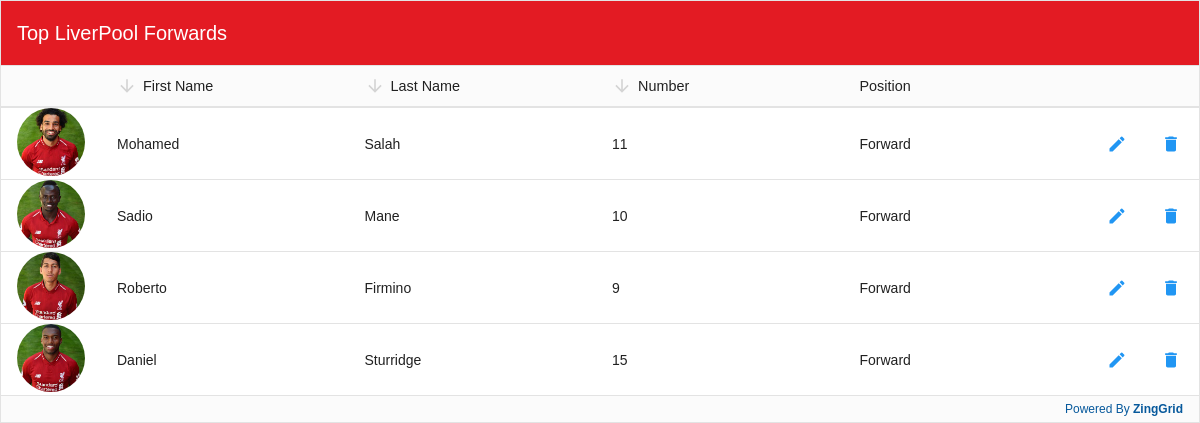
Result
Full
HTML
CSS
JS
Edit
Download
Full Code
<!DOCTYPE html>
<html>

<head>
  <meta charset="utf-8">
  <title>ZingGrid: Simple Grid</title>
  <script nonce="undefined" src="https://cdn.zinggrid.com/zinggrid.min.js"></script>
  <style>
    .zg-body {
      background: #e6e6e6;
    }

    .zg-body zing-grid {
      /* default Liverpool red CSS variable */
      --zg-caption-background: #e31b23;
      --zg-row-body-background_hover: #F6EB61;
    }

    zing-grid[loading] {
      height: 423px;
    }
  </style>
</head>

<body class="zg-body">
  <zing-grid caption="Top LiverPool Forwards" sort src="https://storage.googleapis.com/zinggrid-pwa.appspot.com/liverpool_forwards.json" editor>

    <zg-colgroup>
      <zg-column index="playerImg" header=" " width="100" sort="disabled" editor="false" type="image" type-image-mask="circle" type-image-alt="Player Img N/A"></zg-column>
      <zg-column index="firstName"></zg-column>
      <zg-column index="lastName"></zg-column>
      <zg-column index="number" type="range" type-range-step="1"></zg-column>
      <zg-column index="position" sort="disabled" type="select" type-select-options="Forward, Midfielder"></zg-column>
      <zg-column type="editor"></zg-column>
      <zg-column type="remover"></zg-column>
    </zg-colgroup>
  </zing-grid>
  <script>
    ZingGrid.setLicense(['26ccbfec16b8be9ee98c7d57bee6e498']);
  </script>
</body>

</html>
<!DOCTYPE html>
<html>
  <head>
    <meta charset="utf-8">
    <title>ZingGrid: Simple Grid</title>
    <script src="https://cdn.zinggrid.com/zinggrid.min.js"></script>
  </head>
  <body class="zg-body">
    <zing-grid
      caption="Top LiverPool Forwards"
      sort
      src="https://storage.googleapis.com/zinggrid-pwa.appspot.com/liverpool_forwards.json"
      editor>

      <zg-colgroup>
        <zg-column
        	index="playerImg"
          header=" "
          width="100"
          sort="disabled"
          editor="false"
          type="image"
          type-image-mask="circle"
          type-image-alt="Player Img N/A"></zg-column>
        <zg-column index="firstName"></zg-column>
        <zg-column index="lastName"></zg-column>
        <zg-column index="number" type="range" type-range-step="1"></zg-column>
        <zg-column
          index="position"
          sort="disabled"
          type="select"
		      type-select-options="Forward, Midfielder"></zg-column>
        <zg-column type="editor"></zg-column>
        <zg-column type="remover"></zg-column>
      </zg-colgroup>
    </zing-grid>
  </body>
</html>
.zg-body { background:#e6e6e6; }

.zg-body zing-grid {
 /* default Liverpool red CSS variable */
 --zg-caption-background: #e31b23;
 --zg-row-body-background_hover: #F6EB61;
}
// No JS code
Interested in this demo? Modify it to your needs in ZingSoft Studio, our testing sandbox. It's free to sign up, and you can come back and edit at any time!