Expandable Row
ZingGrid provides custom HTML, CSS and JavaScript to easily create a collapsible row.
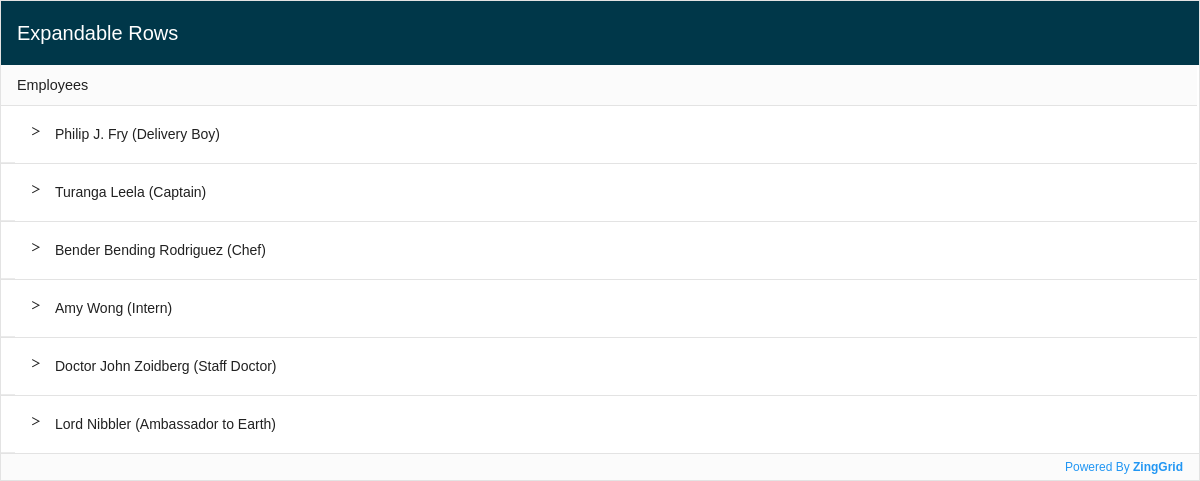
Result
Full
HTML
CSS
JS
Edit
Download
⌃
[[record.name]] ([[record.job]])
Full Code
<!DOCTYPE html>
<html class="zg-html">

<head>
  <meta charset="utf-8">
  <title>ZingGrid Demo</title>
  <script nonce="undefined" src="https://cdn.zinggrid.com/1.2.0/zinggrid.min.js"></script>
  <style>
    .zg-body {
      background: #fff;
    }

    zing-grid[loading] {
      height: 500px;
    }

    /** Expandable Row Trigger **/
    .zg-body .arrow {
      display: inline-block;
      transform: rotate(90deg);
      transform-origin: 0% 0%;
      cursor: pointer;
      font-size: 1.5rem;
      position: relative;
      left: 2.5rem;
      top: 0.25rem;
    }

    .zg-body .active .arrow {
      transform: rotate(180deg);
      left: 2.5rem;
      top: 1.5rem;
    }

    /** Expandable Row Header **/
    .zg-body .row--header {
      display: flex;
      align-items: center;
    }

    .zg-body .team--info {
      margin-left: 2.5rem;
    }

    /** Expandable Row CSS **/
    .zg-body .default {
      border-bottom: 1px solid #ebebeb;
    }

    .zg-body zg-row:hover {
      cursor: pointer;
      background-color: #eeeeee;
      transition: background-color 0.18s ease-in;
    }

    .zg-body .active:hover {
      background-color: initial;
    }

    .zg-body .expandable {
      background: #f5f5f5;
      padding: 1rem 2rem;
      display: none;
      background-color: #eeeeee;
      transition: background-color 0.25s ease-in;
    }

    .zg-body .active .expandable {
      display: block;
    }

    /** Set padding **/
    /** NOTE: Css looks off here, but it is to fix how it looks on site **/
    .zg-body .default,
    .expandable {
      line-height: 1.5rem;
      padding: 0.9rem 1rem;
    }

    .zg-body .default--arrow {
      padding: 0.9rem 0;
    }

    .zg-body zg-cell[type="custom"] {
      padding: 0;
    }

    .zg-body zg-cell[type="custom"]>[data-field-index] {
      display: block;
    }


    zing-grid[loading] {
      height: 481px;
    }
  </style>
</head>

<body class="zg-body">
  <zing-grid caption="Expandable Rows" viewport-stop loading src="https://cdn.zinggrid.com/datasets/users.json">
    <zg-colgroup>
      <zg-column type="custom" header="Employees">
        <template>
          <div class="row--header">
            <div class="default  default--arrow">
              <span class="arrow">⌃</span>
            </div>
            <div class="team--info">[[record.name]] ([[record.job]])</div>
          </div>
          <div class="expandable">
            <p><strong>Age:</strong> [[record.age]]</p>
            <p><strong>Salary:</strong> $[[record.hourly_salary]]</p>
            <p><strong>Birthday:</strong> [[record.birth_date]]</p>
            <p><strong>Location:</strong> [[record.origin]], [[record.home_town]]</p>
          </div>
        </template>
      </zg-column>
    </zg-colgroup>
  </zing-grid>
  <script>
    ZingGrid.setLicense(['26ccbfec16b8be9ee98c7d57bee6e498']); // window:load event for Javascript to run after HTML
    // because this Javascript is injected into the document head
    window.addEventListener('load', () => {
      // Javascript code to execute after DOM content
      const zgRef = document.querySelector('zing-grid');
      zgRef.addEventListener('row:click', bindExpandEvent);

      function bindExpandEvent(e) {
        let oDOMRow = e.detail.ZGTarget;
        oDOMRow.classList.toggle('active');
      }
    });
  </script>
</body>

</html>
<!DOCTYPE html>
<html class="zg-html">
  <head>
    <meta charset="utf-8">
    <title>ZingGrid Demo</title>
    <script src="https://cdn.zinggrid.com/1.2.0/zinggrid.min.js"></script>
  </head>
  <body class="zg-body">
     <zing-grid
        caption="Expandable Rows"
        viewport-stop
        loading
        src="https://cdn.zinggrid.com/datasets/users.json">
       <zg-colgroup>
         <zg-column type="custom" header="Employees">
          <template>
            <div class="row--header">
              <div class="default  default--arrow">
                <span class="arrow">⌃</span>
              </div>
              <div class="team--info">[[record.name]] ([[record.job]])</div>
            </div>
            <div class="expandable">
              <p><strong>Age:</strong> [[record.age]]</p>
              <p><strong>Salary:</strong> $[[record.hourly_salary]]</p>
              <p><strong>Birthday:</strong> [[record.birth_date]]</p>
              <p><strong>Location:</strong> [[record.origin]], [[record.home_town]]</p>
            </div>
           </template>
         </zg-column>
       </zg-colgroup>
    </zing-grid>
	</body>
</html>
.zg-body{ background:#fff; }

zing-grid[loading] { height: 500px; }

/** Expandable Row Trigger **/
.zg-body .arrow { display:inline-block; transform:rotate(90deg); transform-origin: 0% 0%; cursor:pointer; font-size:1.5rem; position:relative; left:2.5rem; top:0.25rem; }
.zg-body .active .arrow { transform:rotate(180deg); left:2.5rem; top:1.5rem; }

/** Expandable Row Header **/
.zg-body .row--header { display:flex; align-items:center; }
.zg-body .team--info { margin-left:2.5rem; }

/** Expandable Row CSS **/
.zg-body .default { border-bottom:1px solid #ebebeb; }
.zg-body zg-row:hover { cursor:pointer; background-color:#eeeeee; transition:background-color 0.18s ease-in; }
.zg-body .active:hover { background-color:initial; }
.zg-body .expandable { background:#f5f5f5; padding:1rem 2rem; display:none; background-color:#eeeeee; transition:background-color 0.25s ease-in; }
.zg-body .active .expandable { display:block; }

/** Set padding **/
/** NOTE: Css looks off here, but it is to fix how it looks on site **/
.zg-body .default, .expandable { line-height:1.5rem; padding:0.9rem 1rem; }
.zg-body .default--arrow { padding:0.9rem 0; }
.zg-body zg-cell[type="custom"] { padding:0; }
.zg-body zg-cell[type="custom"] > [data-field-index] { display:block; }
// window:load event for Javascript to run after HTML
// because this Javascript is injected into the document head
window.addEventListener('load', () => {
    // Javascript code to execute after DOM content
    const zgRef = document.querySelector('zing-grid');
    zgRef.addEventListener('row:click', bindExpandEvent);
    function bindExpandEvent(e) {
        let oDOMRow = e.detail.ZGTarget;
        oDOMRow.classList.toggle('active');
    }
});
Interested in this demo? Modify it to your needs in ZingSoft Studio, our testing sandbox. It's free to sign up, and you can come back and edit at any time!