Conditionally Rendered Rows
You can style rows by adding the
row-class attribute to the <zing-grid> tag.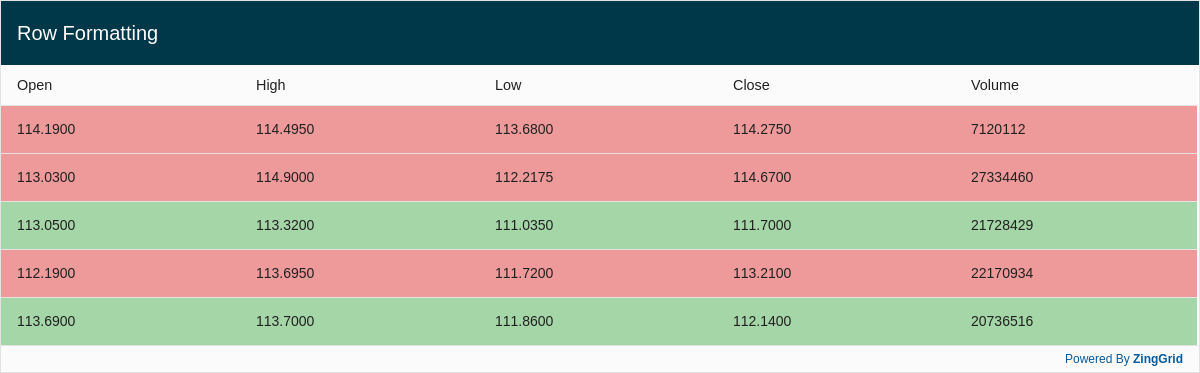
Result
Full
HTML
CSS
JS
Edit
Download
Full Code
<!DOCTYPE html>
<html>

<head>
  <meta charset="utf-8">
  <title>ZingGrid: Simple Grid</title>
  <script nonce="undefined" src="https://cdn.zinggrid.com/zinggrid.min.js"></script>
  <style>
    .increased {
      background: #a5d6a7;
    }

    .decreased {
      background: #ef9a9a;
    }

    zing-grid[loading] {
      height: 373px;
    }
  </style>
</head>

<body class="zg-body">
  <zing-grid caption="Row Formatting" row-class="_renderStocks">
    <zg-data data='[
        {
            "open": "114.1900",
            "high": "114.4950",
            "low": "113.6800",
            "close": "114.2750",
            "volume": "7120112"
        }, {
            "open": "113.0300",
            "high": "114.9000",
            "low": "112.2175",
            "close": "114.6700",
            "volume": "27334460"
        }, {
            "open": "113.0500",
            "high": "113.3200",
            "low": "111.0350",
            "close": "111.7000",
            "volume": "21728429"
        }, {
            "open": "112.1900",
            "high": "113.6950",
            "low": "111.7200",
            "close": "113.2100",
            "volume": "22170934"
        }, {
            "open": "113.6900",
            "high": "113.7000",
            "low": "111.8600",
            "close": "112.1400",
            "volume": "20736516"
        }
      ]'></zg-data>
  </zing-grid>
  <script>
    ZingGrid.setLicense(['26ccbfec16b8be9ee98c7d57bee6e498']);

    function _renderStocks(record, $cell) {
      // if open is higher than close value
      if (record.open > record.close) return 'increased';

      return 'decreased';
    }
  </script>
</body>

</html>
<!DOCTYPE html>
<html>
  <head>
    <meta charset="utf-8">
    <title>ZingGrid: Simple Grid</title>
    <script src="https://cdn.zinggrid.com/zinggrid.min.js"></script>
  </head>
  <body class="zg-body">
    <zing-grid
      caption="Row Formatting"
      row-class="_renderStocks">
      <zg-data data='[
        {
            "open": "114.1900",
            "high": "114.4950",
            "low": "113.6800",
            "close": "114.2750",
            "volume": "7120112"
        }, {
            "open": "113.0300",
            "high": "114.9000",
            "low": "112.2175",
            "close": "114.6700",
            "volume": "27334460"
        }, {
            "open": "113.0500",
            "high": "113.3200",
            "low": "111.0350",
            "close": "111.7000",
            "volume": "21728429"
        }, {
            "open": "112.1900",
            "high": "113.6950",
            "low": "111.7200",
            "close": "113.2100",
            "volume": "22170934"
        }, {
            "open": "113.6900",
            "high": "113.7000",
            "low": "111.8600",
            "close": "112.1400",
            "volume": "20736516"
        }
      ]'></zg-data>
    </zing-grid>
  </body>
</html>
.increased { background:#a5d6a7; }
.decreased { background:#ef9a9a; }
function _renderStocks(record, $cell) {
 	// if open is higher than close value
  if (record.open > record.close) return 'increased';

  return 'decreased';
}
Interested in this demo? Modify it to your needs in ZingSoft Studio, our testing sandbox. It's free to sign up, and you can come back and edit at any time!