Server Search
Enable server search through the
searchKey attribute with <zg-param name="searchKey" value="search">.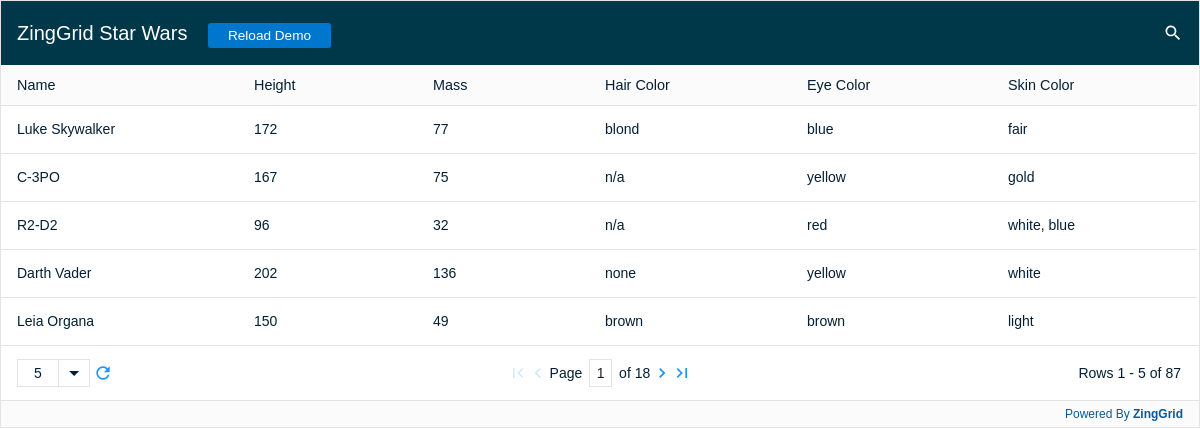
Result
Full
HTML
CSS
JS
Edit
Download
Full Code
<!DOCTYPE html>
<html>

<head>
  <meta charset="utf-8">
  <title>ZingGrid Demo</title>
  <script nonce="undefined" src="https://cdn.zinggrid.com/zinggrid.min.js"></script>
  <style>
    :root {
      --bgColor: #041F35;
      --headerFontColor: #fff;
      --mainFontColor: var(--bgColor, darkblue);
      --rowColor: #777;

      --zg-caption-background: var(--bgColor, inherit);
      --zg-caption-color: var(--headerFontColor, white);
      --zing-grid-color: var(--mainFontColor);
    }


    .zg-body .button {
      text-align: center;
      background: #07C;
      color: #FFF;
      cursor: pointer;
      border-radius: 3px;
      font-size: 0.85rem;
      padding: 5px 20px;
      cursor: pointer;
      margin: 15px 0 15px 15px;
      position: relative;
      top: 0;
    }

    .zg-body .button:hover {
      background: #1b6ead;
    }

    zing-grid[loading] {
      min-height: 600px;
    }

    /* hide some inner grid elements */
    zing-grid[loading] zg-pager {
      visibility: hidden;
    }


    zg-load-mask {
      /* set the color to match the gif */
      opacity: .90;
      top: 65px;
      height: calc(100% - 65px);
      /* custom gif for loading */
      background-image: url('https://storage.googleapis.com/zg-demos.appspot.com/starwars_loading.gif');
      /* Center and scale the image nicely */
      background-position: center;
      background-repeat: repeat;
      background-size: contain;
    }

    zing-grid[loading] {
      height: 428px;
    }
  </style>
</head>

<body class="zg-body">
  <zing-grid pager page-size="5" search>
    <zg-caption>
      ZingGrid Star Wars
      <span class="button" id="reloadBtn">Reload Demo</span>
    </zg-caption>
    <zg-data>
      <!-- define the main source for the API -->
      <zg-param name="src" value="https://swapi.py4e.com/api/people/"></zg-param>

      <!-- define the path in the JSON to get the array of results.
            In this case it is body.results -->
      <zg-param name="recordPath" value="results"></zg-param>

      <!-- if loadByPage is set to true it will go to the
          server for each new page of data -->
      <zg-param name="loadByPage" value="true"></zg-param>

      <!-- define the "page" query parameter -->
      <zg-param name="pageKey" value="page"></zg-param>

      <!-- Need to tell ZG how many records were returned so it knows
            how to divide up the page-size -->
      <zg-param name="countPath" value="count"></zg-param>

      <!-- define the path in the result JSON to find next/prev urls -->
      <zg-param name="nextPath" value="next"></zg-param>
      <zg-param name="prevPath" value="previous"></zg-param>

      <!-- Need to tell ZG how mto search the API -->
      <zg-param name="searchKey" value="search"></zg-param>
    </zg-data>
    <zg-colgroup>
      <zg-column index="name"></zg-column>
      <zg-column index="height"></zg-column>
      <zg-column index="mass"></zg-column>
      <zg-column index="hair_color"></zg-column>
      <zg-column index="eye_color"></zg-column>
      <zg-column index="skin_color"></zg-column>
    </zg-colgroup>
  </zing-grid>
  <script>
    ZingGrid.setLicense(['26ccbfec16b8be9ee98c7d57bee6e498']); // window:load event for Javascript to run after HTML
    // because this Javascript is injected into the document head
    window.addEventListener('load', () => {
      // Javascript code to execute after DOM content
      const zgRef = document.querySelector('zing-grid');
      zgRef.executeOnLoad(() => {
        // Add event listener to button
        reloadBtn.addEventListener('click', () => {
          zgRef.refresh();
        });
      });
    });
  </script>
</body>

</html>
<!DOCTYPE html>
<html>
	<head>
    <meta charset="utf-8">
    <title>ZingGrid Demo</title>
		<script src="https://cdn.zinggrid.com/zinggrid.min.js"></script>
	</head>
	<body class="zg-body">
    <zing-grid
      pager
      page-size="5"
      search>
      <zg-caption>
        ZingGrid Star Wars
        <span class="button" id="reloadBtn">Reload Demo</span>
      </zg-caption>
      <zg-data>
        <!-- define the main source for the API -->
        <zg-param name="src" value="https://swapi.py4e.com/api/people/"></zg-param>

        <!-- define the path in the JSON to get the array of results.
            In this case it is body.results -->
        <zg-param name="recordPath" value="results"></zg-param>

        <!-- if loadByPage is set to true it will go to the
          server for each new page of data -->
        <zg-param name="loadByPage" value="true"></zg-param>

        <!-- define the "page" query parameter -->
        <zg-param name="pageKey" value="page"></zg-param>

        <!-- Need to tell ZG how many records were returned so it knows
            how to divide up the page-size -->
        <zg-param name="countPath" value="count"></zg-param>

        <!-- define the path in the result JSON to find next/prev urls -->
        <zg-param name="nextPath" value="next"></zg-param>
        <zg-param name="prevPath" value="previous"></zg-param>

        <!-- Need to tell ZG how mto search the API -->
        <zg-param name="searchKey" value="search"></zg-param>
      </zg-data>
      <zg-colgroup>
        <zg-column index="name"></zg-column>
        <zg-column index="height"></zg-column>
        <zg-column index="mass"></zg-column>
        <zg-column index="hair_color"></zg-column>
        <zg-column index="eye_color"></zg-column>
        <zg-column index="skin_color"></zg-column>
      </zg-colgroup>
    </zing-grid>
	</body>
</html>
:root {
  --bgColor: #041F35;
  --headerFontColor: #fff;
  --mainFontColor: var(--bgColor, darkblue);
  --rowColor: #777;

  --zg-caption-background: var(--bgColor, inherit);
  --zg-caption-color: var(--headerFontColor, white);
  --zing-grid-color: var(--mainFontColor);
}


.zg-body .button {
  text-align: center;
  background: #07C;
  color: #FFF;
  cursor: pointer;
  border-radius: 3px;
  font-size: 0.85rem;
  padding: 5px 20px;
  cursor: pointer;
  margin: 15px 0 15px 15px;
  position: relative;
  top: 0;
}

.zg-body .button:hover {
	background: #1b6ead;
}
zing-grid[loading]{
  min-height: 600px;
}

/* hide some inner grid elements */
zing-grid[loading]  zg-pager {
  visibility: hidden;
}


zg-load-mask {
  /* set the color to match the gif */
  opacity: .90;
  top: 65px;
  height: calc(100% - 65px);
  /* custom gif for loading */
  background-image: url('https://storage.googleapis.com/zg-demos.appspot.com/starwars_loading.gif');
  /* Center and scale the image nicely */
  background-position: center;
  background-repeat: repeat;
  background-size: contain;
}
// window:load event for Javascript to run after HTML
// because this Javascript is injected into the document head
window.addEventListener('load', () => {
  // Javascript code to execute after DOM content
  const zgRef = document.querySelector('zing-grid');
  zgRef.executeOnLoad(() => {
  	// Add event listener to button
    reloadBtn.addEventListener('click', () => {
      zgRef.refresh();
    });
  });
});
Interested in this demo? Modify it to your needs in ZingSoft Studio, our testing sandbox. It's free to sign up, and you can come back and edit at any time!