Default Filters
To create a filter that will appear below the grid headers, add the
filter attribute to the <zing-grid> tag.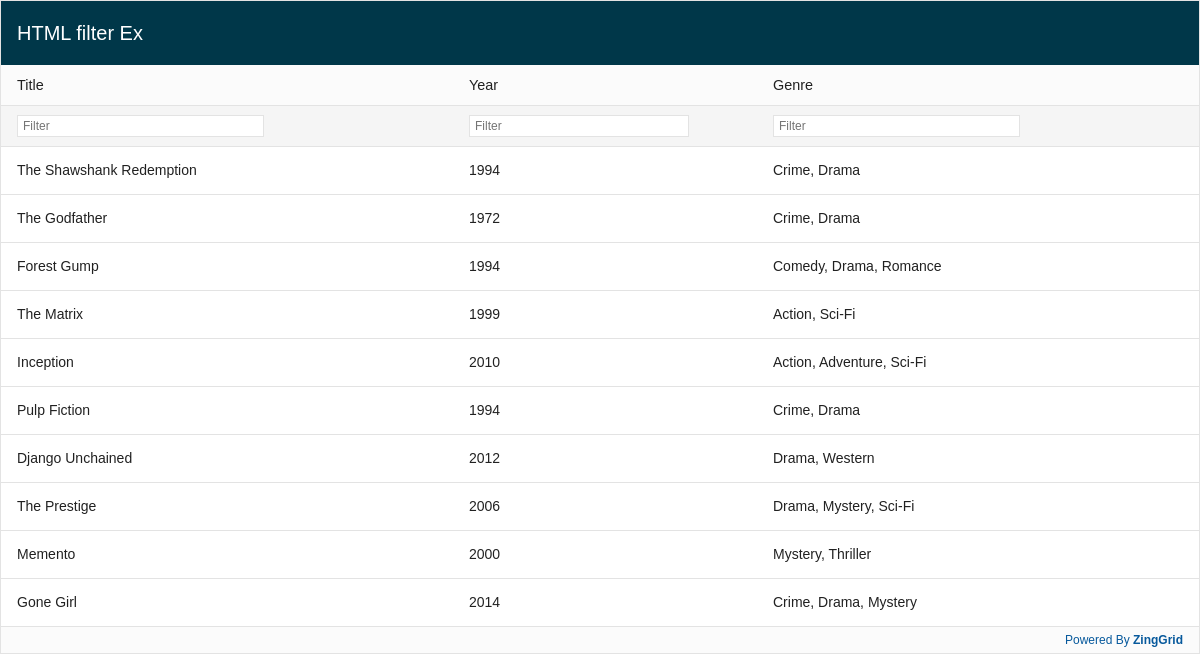
Result
Full
HTML
CSS
JS
Edit
Download
Full Code
<!DOCTYPE html>
<html>

<head>
  <meta charset="utf-8">
  <title>ZingGrid Demo</title>
  <script nonce="undefined" src="https://cdn.zinggrid.com/zinggrid.min.js"></script>
  <style>
    zing-grid[loading] {
      height: 654px;
    }
  </style>
</head>

<body class="zg-body">
  <zing-grid caption="HTML filter Ex" filter viewport-stop>
    <zg-data data=' [{
        "title": "The Shawshank Redemption",
        "year": "1994",
        "genre": "Crime, Drama"
      }, {
        "title": "The Godfather",
        "year": "1972",
        "genre": "Crime, Drama"
      }, {
        "title": "Forest Gump",
        "year": "1994",
        "genre": "Comedy, Drama, Romance"
      }, {
        "title": "The Matrix",
        "year": "1999",
        "genre": "Action, Sci-Fi"
      }, {
        "title": "Inception",
        "year": "2010",
        "genre": "Action, Adventure, Sci-Fi"
      }, {
        "title": "Pulp Fiction",
        "year": "1994",
        "genre": "Crime, Drama"
      }, {
        "title": "Django Unchained",
        "year": "2012",
        "genre": "Drama, Western"
      }, {
        "title": "The Prestige",
        "year": "2006",
        "genre": "Drama, Mystery, Sci-Fi"
      }, {
        "title": "Memento",
        "year": "2000",
        "genre": "Mystery, Thriller"
      }, {
        "title": "Gone Girl",
        "year": "2014",
        "genre":"Crime, Drama, Mystery"
      }]'>
    </zg-data>
  </zing-grid>
  <script>
    ZingGrid.setLicense(['26ccbfec16b8be9ee98c7d57bee6e498']);
  </script>
</body>

</html>
<!DOCTYPE html>
<html>
	<head>
    <meta charset="utf-8">
    <title>ZingGrid Demo</title>
		<script src="https://cdn.zinggrid.com/zinggrid.min.js"></script>
	</head>
	<body class="zg-body">
		<zing-grid
      caption="HTML filter Ex"
      filter
      viewport-stop>
		  <zg-data data=' [{
        "title": "The Shawshank Redemption",
        "year": "1994",
        "genre": "Crime, Drama"
      }, {
        "title": "The Godfather",
        "year": "1972",
        "genre": "Crime, Drama"
      }, {
        "title": "Forest Gump",
        "year": "1994",
        "genre": "Comedy, Drama, Romance"
      }, {
        "title": "The Matrix",
        "year": "1999",
        "genre": "Action, Sci-Fi"
      }, {
        "title": "Inception",
        "year": "2010",
        "genre": "Action, Adventure, Sci-Fi"
      }, {
        "title": "Pulp Fiction",
        "year": "1994",
        "genre": "Crime, Drama"
      }, {
        "title": "Django Unchained",
        "year": "2012",
        "genre": "Drama, Western"
      }, {
        "title": "The Prestige",
        "year": "2006",
        "genre": "Drama, Mystery, Sci-Fi"
      }, {
        "title": "Memento",
        "year": "2000",
        "genre": "Mystery, Thriller"
      }, {
        "title": "Gone Girl",
        "year": "2014",
        "genre":"Crime, Drama, Mystery"
      }]'>
		  </zg-data>
		</zing-grid>
	</body>
</html>
/* No CSS styles */
// No JS code
Interested in this demo? Modify it to your needs in ZingSoft Studio, our testing sandbox. It's free to sign up, and you can come back and edit at any time!