Search by External Input
You can use an external input and our API method
searchGrid('...') to dynamically search the grid from an external input. The benefit of external search input is you can style it, add typeahead, and bind your framework search input to the grid.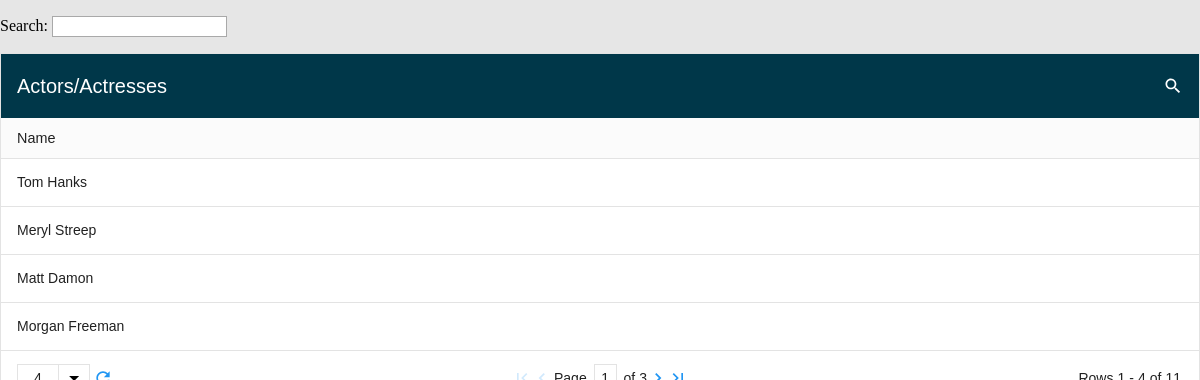
Result
Full
HTML
CSS
JS
Edit
Download
Full Code
<!DOCTYPE html>
<html>

<head>
  <meta charset="utf-8">
  <title>ZingGrid Demo</title>
  <script nonce="undefined" src="https://cdn.zinggrid.com/zinggrid.min.js"></script>
  <style>
    .zg-body {
      background: #e6e6e6;
    }

    .zg-body .controls--container {
      display: flex;
      flex-direction: row;
      justify-content: space-between;
      flex-wrap: wrap;
      margin: 1rem 0;
    }

    zing-grid[loading] {
      height: 380px;
    }
  </style>
</head>

<body class="zg-body">
  <div class="inner--container">
    <!-- toggle controls -->
    <div class="controls--container">
      <div>
        <label for="searchGrid">Search: </label>
        <input type="search" id="searchGrid">
      </div>
    </div>
    <zing-grid caption="Actors/Actresses" search pager page-size="4">
      <zg-data data='[{"name": "Tom Hanks"}, {"name": "Meryl Streep"}, {"name": "Matt Damon"}, {"name": "Morgan Freeman"}, {"name": "Julia Roberts"}, {"name": "Brad Pitt"}, {"name": "Natalie Portman"}, {"name": "Angelina Jolie"}, {"name": "Johnny Depp"}, {"name": "Keira Knightley"}, {"name": "Harrison Ford"}]'></zg-data>
    </zing-grid>
  </div>
  <script>
    ZingGrid.setLicense(['26ccbfec16b8be9ee98c7d57bee6e498']); // window:load event for Javascript to run after HTML
    // because this Javascript is injected into the document head
    window.addEventListener('load', () => {
      // Javascript code to execute after DOM content
      // element references
      const searchGrid = document.getElementById('searchGrid');
      const zgRef = document.querySelector('zing-grid');
      // debounce search
      let searchTimeoutId = null;
      // function declarations
      function _searchGrid(e) {
        // debounce search
        clearTimeout(searchTimeoutId);
        let targetValue = e.target.value;
        // delay 100 milliseconds to debounce user input
        searchTimeoutId = setTimeout((userInput) => {
          requestAnimationFrame(() => zgRef.searchGrid(userInput));
        }, 100, targetValue);
      }
      // add event listeners
      searchGrid.addEventListener('keyup', _searchGrid);
      searchGrid.addEventListener('change', _searchGrid);
      searchGrid.addEventListener('search', _searchGrid);
    });
  </script>
</body>

</html>
<!DOCTYPE html>
<html>
  <head>
    <meta charset="utf-8">
    <title>ZingGrid Demo</title>
    <script src="https://cdn.zinggrid.com/zinggrid.min.js"></script>
  </head>
  <body class="zg-body">
		<div class="inner--container">
       <!-- toggle controls -->
       <div class="controls--container">
         <div>
          <label for="searchGrid">Search: </label>
          <input type="search" id="searchGrid">
         </div>
       </div>
				<zing-grid caption="Actors/Actresses" search pager page-size="4">
		  	<zg-data data='[{"name": "Tom Hanks"}, {"name": "Meryl Streep"}, {"name": "Matt Damon"}, {"name": "Morgan Freeman"}, {"name": "Julia Roberts"}, {"name": "Brad Pitt"}, {"name": "Natalie Portman"}, {"name": "Angelina Jolie"}, {"name": "Johnny Depp"}, {"name": "Keira Knightley"}, {"name": "Harrison Ford"}]'></zg-data>
			</zing-grid>
		</div>
	</body>
</html>
.zg-body {background:#e6e6e6;}

.zg-body .controls--container {
	display: flex;
  flex-direction: row;
  justify-content: space-between;
  flex-wrap: wrap;
  margin: 1rem 0;
}
// window:load event for Javascript to run after HTML
// because this Javascript is injected into the document head
window.addEventListener('load', () => {
  // Javascript code to execute after DOM content
  // element references
  const searchGrid = document.getElementById('searchGrid');
  const zgRef = document.querySelector('zing-grid');
  // debounce search
  let searchTimeoutId = null;
  // function declarations
  function _searchGrid(e) {
    // debounce search
    clearTimeout(searchTimeoutId);
    let targetValue = e.target.value;
    // delay 100 milliseconds to debounce user input
    searchTimeoutId = setTimeout((userInput) => {
      requestAnimationFrame(() => zgRef.searchGrid(userInput));
    }, 100, targetValue);
  }
  // add event listeners
  searchGrid.addEventListener('keyup', _searchGrid);
  searchGrid.addEventListener('change', _searchGrid);
  searchGrid.addEventListener('search', _searchGrid);
});
Interested in this demo? Modify it to your needs in ZingSoft Studio, our testing sandbox. It's free to sign up, and you can come back and edit at any time!